
Every 3 users, 1 tells me why they uninstalled my extension. It used to be 1 every 33. Here is what I did, and you can implement it in minutes
Key takeaways
- Add an uninstall landing page that opens whenever the user uninstalls the extension.
- Add an emotional trigger ("I'm sad to see you go," etc.).
- Use radio buttons for all common reasons for uninstalling (it does not work, it is buggy, privacy concerns, etc.).
- Show an optional textarea depending on the radio button selected.
- Most importantly, instead of naming the button "Send," name it "Confirm Uninstall."
Every 3 users, 1 tells me why they uninstalled my extension. It used to be 1 every 33. Here is what I did, and you can implement it in minutes
A while ago I wrote about how I coded 12 chrome extensions in less than 2 months and documented every single one of them from idea to deploy on YouTube and on my blog.
Even though all of my extensions had proper attention and care put into them, I'm still getting an uninstall rate. That's just normal. I hope.
Every time an extension gets uninstalled, I used to show a page like "sorry to see you go, what went wrong?" with a textarea for feedback and, optionally, their email address so I could reach out once I fixed the issue.
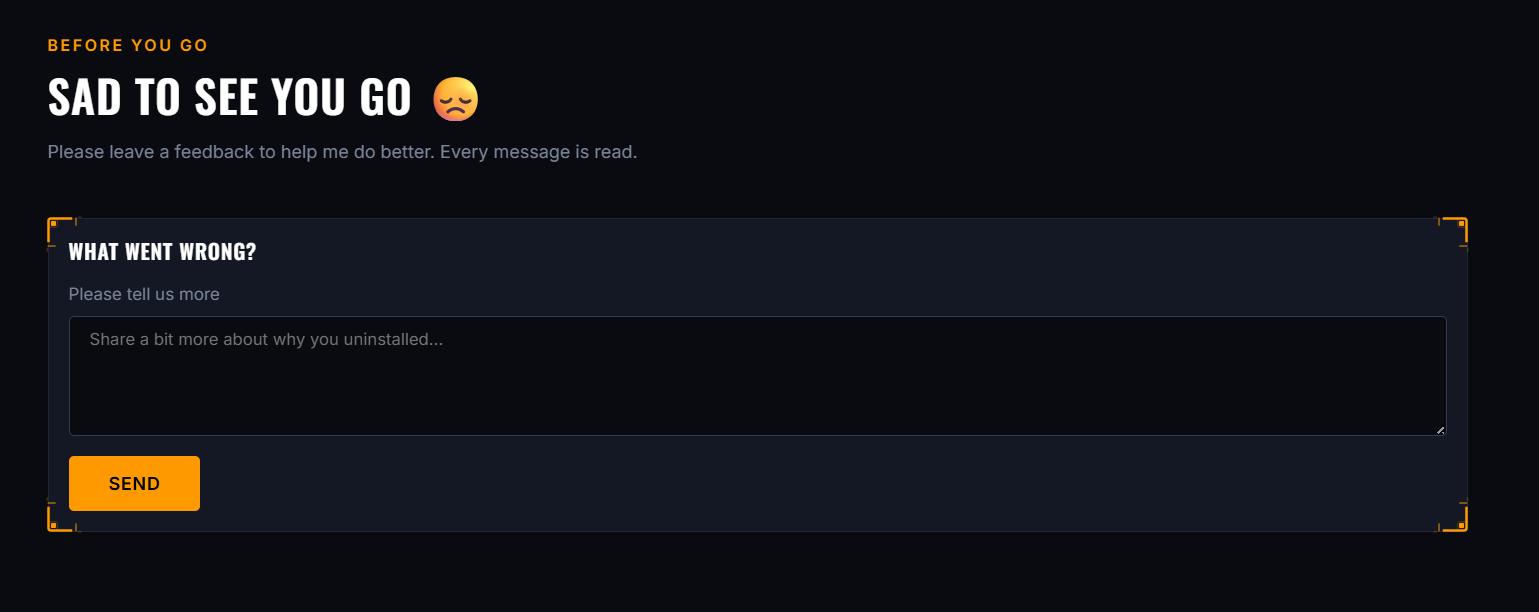
It was ok. I was getting 1 - 2 messages per day. Not bad, but not great either.
Until I was actually testing a few chrome extensions and, when uninstalling one of them, I noticed their uninstall page looked much cleaner and apparently had less friction: they were using radio buttons instead of a blank textarea.
I'd seen that before. But 2 things caught my attention that I hadn't seen done before, and I decided to implement both on my own.
The first one: depending on which radio button you clicked, it showed you a different message or input. For example, for the "privacy concerns" option, instead of a textarea you'd see a short message explaining that privacy is serious and a link to their privacy policy. For specific issues, if it detected you were on an older version (it was passing the chrome extension version in the query string), it would show you a link to update to the most recent version.

That's a pretty smart pattern. You're not just collecting feedback, you're actually resolving the issue in real time for some users.
But the most interesting one was actually super simple.
Instead of naming the button "Send", it was "Confirm Uninstall".
That's it.
I think what happens here is that "Send" feels like a neutral form submission, low stakes, easy to click without thinking. "Confirm Uninstall" makes the user feel like they're taking an action, not just sending a form. It adds just enough pause that the people who click it anyway are doing it intentionally, and the ones who hesitate might reconsider.
Here are my actual numbers:
All time (until Jul 21): 3.2% feedback rate, 632 uninstalls, 20 feedback messages
Jul 15 to Jul 21 (7 days): 2.8% feedback rate, 178 uninstalls, 5 feedback messages
Jul 22 to today: 34.2% feedback rate, 193 uninstalls, 66 feedback messages
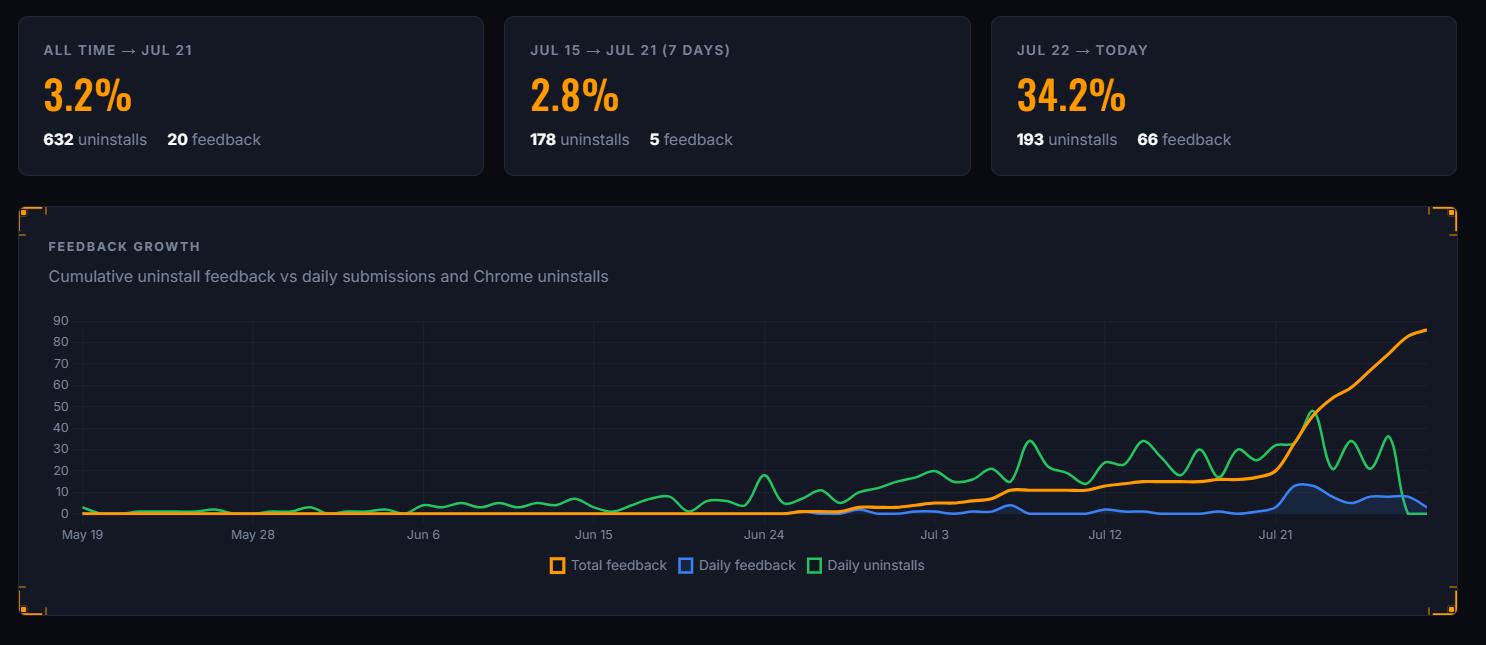
Not only did the feedback rate jump, the uninstall count itself dropped too. Less people are uninstalling, and way more of the ones who do are telling me why.
Ever since I implemented this, the messages I receive are much more frequent. And more importantly, they're from real people who are genuinely unsatisfied and providing actually useful feedback. And I know exactly what to fix instead of guessing.
Across 12 extensions, this kind of feedback loop becomes crucial. And I'm able to know from which extension it's coming from based on the data sent via the query string.
You can't fix what you don't know is broken, and a well-designed uninstall page is one of the cheapest ways to stay connected to users who are leaving.
Are you building chrome extensions? What does your uninstall page look like?
More from the blog
Keep reading
12 Chrome Extensions Deployed Within 2 Months (Not AI Slop). All Data + My First Financially Successful Extension
I coded and published 12 extensions in 52 days and documented every single one - all my private data, the numbers, what I learned, and the story of my first financially successful Chrome extension.

I Made My First Sale in This Series! (Shopify Client Work, $1400)
How I landed a $1400 Shopify project, used AI to analyze competitors, built a custom product page with metafields, and shipped a full ecom store - all while using a Chrome extension I built myself to sync the theme in real time.
Twitter Blocked Me, I Moved to BlueSky, But It Had One Major Issue. So I Built a Chrome Extension to Fix It
How I got blocked by Twitter, ended up on Bluesky, scraped 13k Reddit comments to find a chrome extension idea, and shipped a free extension to hide reposts from specific accounts — all in one session.